Carpool
Sit Back, Relax, & Share the Ride
Carpooling lets you take time back in your day by sharing the financial and mental load of your commute with others:
- Spend less: Carpooling coupled with taking turns driving allows you to spend half as much time driving and half as much money on maintenance — and that’s just with one other person! Imagine how much you’d save with a carpooling group of 3 or 4!
- Sit back and relax: When you’re not driving it lets you focus on relaxing activities like reading, socializing with your fellow carpoolers, playing games, or enjoying some time decompressing from your work day.
Find a Carpool Partner with Get There Connect
- Log in or sign up for a free Get There Connect account.
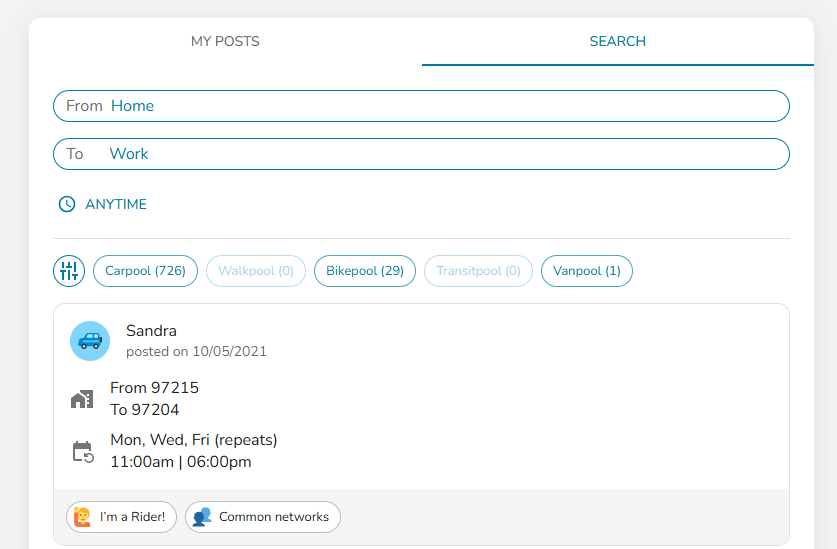
- Go to “Pools” in the lefthand menu. There, you’ll find two tabs: ‘My Posts’ and ‘Search’.
- Select ‘Search’ to explore available ride options created by others.
- You can customize your search by:
- Choosing whether you want to be matched with all users or only within specific networks (such as your company or location).
- Using filters to include or exclude other types of pools such as vanpools, walkpools, bikepools, and transitpools.
- Adding your specific time schedule requirements.
- A list of Pool Matches will populate, if available. Click on the Pool Match card for details on the ride. For Carpool, each posting will specify whether the person is offering a ride (“I’m the Driver!”), is open to either driving or being a passenger (“I’m a Driver or Rider!”), or is seeking to be a passenger only (“I’m a Rider!”).
- Click “Message” to send a message to the Pool Match to coordinate your ride. Your message will be sent to their email inbox and your email will be provided to them to coordinate outside of the platform.
Learn more here.
Post a Carpool on Get There Connect
- Log in or sign up for a free Get There Connect account.
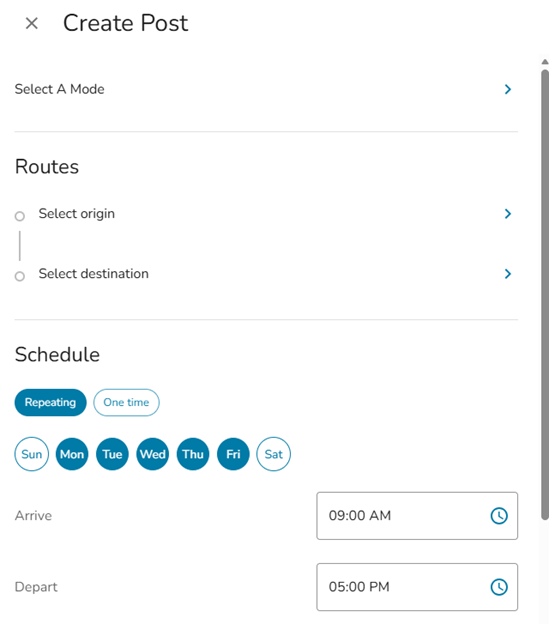
- Go to “Pools” in the lefthand menu. There, you’ll find two tabs: ‘My Posts’ and ‘Search’.
- Select ‘My Posts’ to post a ride to share with others.
- Enter the date, time, starting point, and destination, then click ‘Save’. Your carpool offer becomes part of the ridematching system, automatically visible to others in both ‘Explore Options’ and ‘Pools.’

Tips for Starting Carpools
- Promote your carpool: Find people potential carpool partner(s) using Get There Connect and/or using this carpool card in English or Spanish.
- Meet up: Go for coffee or lunch with your potential carpool partner(s) prior to your first ride and make sure it’s a good fit. Trust your gut – if something makes you feel uncomfortable, consider finding a different carpool.
- Set ground rules: Establish policies with your carpool partner(s). Have a conversation about music, food/drinks, smoking, conversations, etc.
- Figure out logistics: Determine the route and schedule for the carpool, maximum wait times for being late, as well as any back up plans.
- Determine the costs: Set cost-splitting expectations and a method for payment. This includes how costs will be shared and how often payments will be made. Consider using a cash app to make easy requests and transactions.
- Establish communication lines: Exchange preferred contact information ahead of time. Make sure to get emergency contacts for each member of your carpool, just in case.
- Make a schedule: Schedule driver days/weeks/months and stick to it.
- Enjoy the ride!