
Get There Connect Network Manager Toolkit
For Employers
Getting Started
Make commutes and work experience better using Get There Connect—Oregon’s free online commute planning, ridematching, metrics tracking, and rewards tool accessible via computer or mobile device.
Rolling out Get There Connect doesn’t require any set up—employees can sign up and use the tool, and we can provide technical support. Free employer networks can be set up with custom URLs and QR Codes to track organization metrics, offer internal rewards and incentives, and hold challenges to encourage your employees to use commute options.
If you need support or have questions about getting started, contact us at [email protected]
You can access ready-to-use employee materials that can be co-branded and customized with your employer network URL and QR code in our online Commute Solutions Toolkit to promote Get There Connect and using commute options.
This toolkit will guide you through user sign-up steps, employer features, network manager tips, and frequently asked questions.
User Sign-up Steps
Anyone who lives in and/or works in Oregon can use Get There Connect for free. The tool currently supports English, Spanish, and Chinese. Your employees can create an account and join your network in a few simple steps.
Search for a network
- Log in or sign up for a free Get There Connect account on the web or in the app.
- Go to Account > Networks to search for local networks to join.
- Can’t find a network? Request one here.
Invite users with a custom link
As a network manager you can share a custom join link for your network. This link will walk new or existing Get There Connect users through the process of joining your network. You can find the link in your management dashboard:
- Go to Management Dashboard > Networks and select your network.
- On the Membership tab, scroll down to the “Shareable Join Link” section.
- https://getthere.rideamigos.com/s/YOUR NETWORK NAME
- Share the link with anyone you would like to join your network.
User Features
With Get There Connect, employees can:
- Find and compare commute options like transit, carpooling, vanpooling, biking, and walking
- Find others going their way and share the ride in a carpool or vanpool
- Explore bike routes and find biking partners
- Track stats like money saved, calories burned, and reduced CO2
- Join challenges and earn local rewards (as available)
Employer Features & Network Manager Tips
Employer Network Managers can find the following features in their Management Dashboard. To access the Management Dashboard:
- Log in to Get There Connect.
- Click “Management Dashboard” at the top of the screen.
- Click on Networks and select your Network.
Customizing your network
Update your network information.
- Go to Management Dashboard > Networks and select your network.
- Update your information in the Overview and Membership tabs.
- Click “Save Changes”.
Create subnetworks
- Go to Management Dashboard > Networks and select your network.
- Select the Subnetworks tab.
- Click the “+” sign in the top left to search for or create new Subnetworks.
Track organizational metrics
Measure statistics like trips logged and carbon emissions reduced.
- Click “Network Home” in the lefthand menu.
- Click “Network Stats”.
- Click the dropdown to the right of the “Network Statistics” box to change the timeframe of the metrics snapshot.
Generate reports
Gain insights and track organizational metrics like employee commute options use, vehicle miles, and more.
- Click “Reports” in the lefthand menu.
- Select your desired report.
- You can explore over 100 fields in the User Report!
- To select fields/columns, click the “5/133” dropdown in the upper left and select your desired fields/columns. Click “Change” to adjust the timeframe:
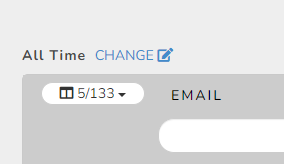
- To export to Excel, click “Report Actions” in the upper right.
Conduct surveys
Understand employee travel behavior and commute options interest and meet Oregon’s ECO Rule requirements in the Portland metro area.
- Click “Surveys” in the left-hand menu.
- Click “New Survey” in the upper right.
- Start from scratch (New FreeForm Survey) or select a template.
- Note: The “ODOT Commute Survey” template can be used for ECO surveys.
Offer rewards and incentives
Inspire and reward your employees for using commute options.
- Click “Manage” at the top of the screen.
- Click “Incentives” or “Point Programs”.
Read this article to learn more about the difference between the two, and to get tips on how to set them up. Our Get There Connect experts can support you. Reach out to [email protected] for direct support.
Host challenges
Engage your employees through friendly competition.
- Click “Manage” at the top of the screen.
- Click “Challenges”.
Read this article to learn more about challenges and how to set them up. Our Get There Connect experts can support you. Reach out to [email protected] for direct support.
Add additional network managers
Give others access to the Management Dashboard and share responsibilities.
- Click “Managers” in the left-hand menu.
- Click the “Add Manager to Network” dropdown menu.
- Search for the person you’d like to add.
- Note: They will need to create a Get There Connect account first.
To remove a manager, click on the arrow next to their email address and select “Remove Manager”.
For Fee Add-on Capabilities
The following features are available for a fee. Email us at [email protected] for more information.
- Payroll integration
- Direct user communications
- Co-branding your network
- Automated reward fulfillment/Tango Card
Why set up an employer network?
Employers can use employer networks to track organization metrics, offer internal rewards and incentives, and hold challenges.
Email us at [email protected] and we’ll set up a network for you and provide a custom URL.
Is there a minimum number of people my organization needs to have?
No, employer networks can be set up for organizations of any size.
What if my organization has multiple locations?
We can either set up separate “parent” networks, or one “parent” network with multiple subnetworks underneath it. See above for how to add subnetworks or email us at [email protected] and we can advise.
Get There Connect is meant for people who live or work in Oregon. You are welcome to create networks or subnetworks for all your organizations located in Oregon but cannot do so for any locations outside of Oregon. If you have a worksite location in Clark, Skamania, or Klickitat counties, you can create a network with our sister site, Get There SW Washington. Contact [email protected] for assistance.
Find and Add Users
We can help find and add users to your network. Email us at [email protected].
Remove Users from Network
In your Management Dashboard, click “Members” in the lefthand menu, then click the arrow next to a member’s email address and click “Remove Member”.